Importing VRCFury Content
CVRFury now includes native stubs for VRC and VRCFury components. There is no longer a separate prefab conversion step — you can directly import data from VRCFury prefabs in your scene.
Before You Import

Complete the following steps before clicking any green import buttons on the DSU.Some features (e.g.
FullController) depend on converted CVRFury-format files existing in your project before import is triggered. Importing without these in place will fail or produce incomplete results.
- VRC Components — If the prefab has VRC components (PhysBones, Contacts, etc.), convert them first.
See VRC Component Handling.- Expression Parameters — Convert any VRC parameter files to CVRFury format first.
See Menu and Parameter Conversion.- Expression Menus — Convert any VRC menu files to CVRFury format first.
See Menu and Parameter Conversion.
Import Workflow
- Drag the VRCFury prefab into your Unity scene hierarchy
- Unpack the prefab — right-click it in the hierarchy and choose
Prefab → Unpack Completely.
Adding components to a packed prefab can cause issues and is not supported. - With the unpacked GameObject selected, add a
CVRFury DSU(Data Storage Unit) component to it - The DSU will automatically detect any VRCFury data present on the object and list the features found
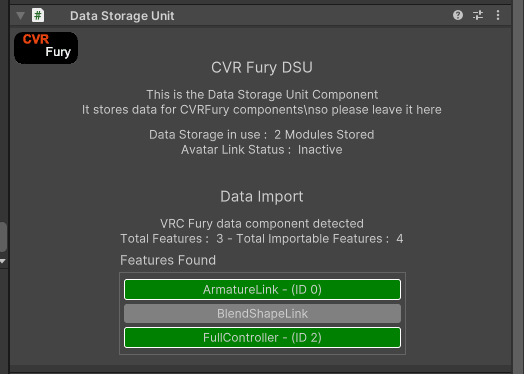
Green entries are supported and can be imported to the DSU. Click them to do so.
Grey entries are not currently supported for import — see Feature Support for the current list.

If the prefab contains VRC components (e.g. PhysBones, Contacts), CVRFury will flag these in the Validator.